Everything you need to schedule effortlesslygrow your businessdelight your clients
Automate bookings, reduce no-shows, and deliver a professional experience. All in one platform.
Every service with its own format and its own rules
Duration, location, buffer, and capacity are set per service. Configure it once and available slots are calculated on their own, without conflicts.
Reminders your clients actually read
You set the rule: channel, timing, recipient, and status. eAgendas sends confirmations, reminders, and follow-ups without anyone having to remember.
- At bookingWhatsApp Hi, Maria! Your appointment is booked: Wednesday the 15th at 2:00 PM. See you!
- 24 h beforeYour appointment is tomorrow at 2:00 PM. Can we confirm?Confirm Reschedule
One-click confirmation, no phone call.
- 1 h beforeSMS Reminder: your appointment is today at 2:00 PM.
- After the appointmentSatisfaction surveyHow was your appointment?
Responses recorded automatically, no chasing anyone.
Filter by status and notify only confirmed, canceled, or rescheduled appointments. Your choice.
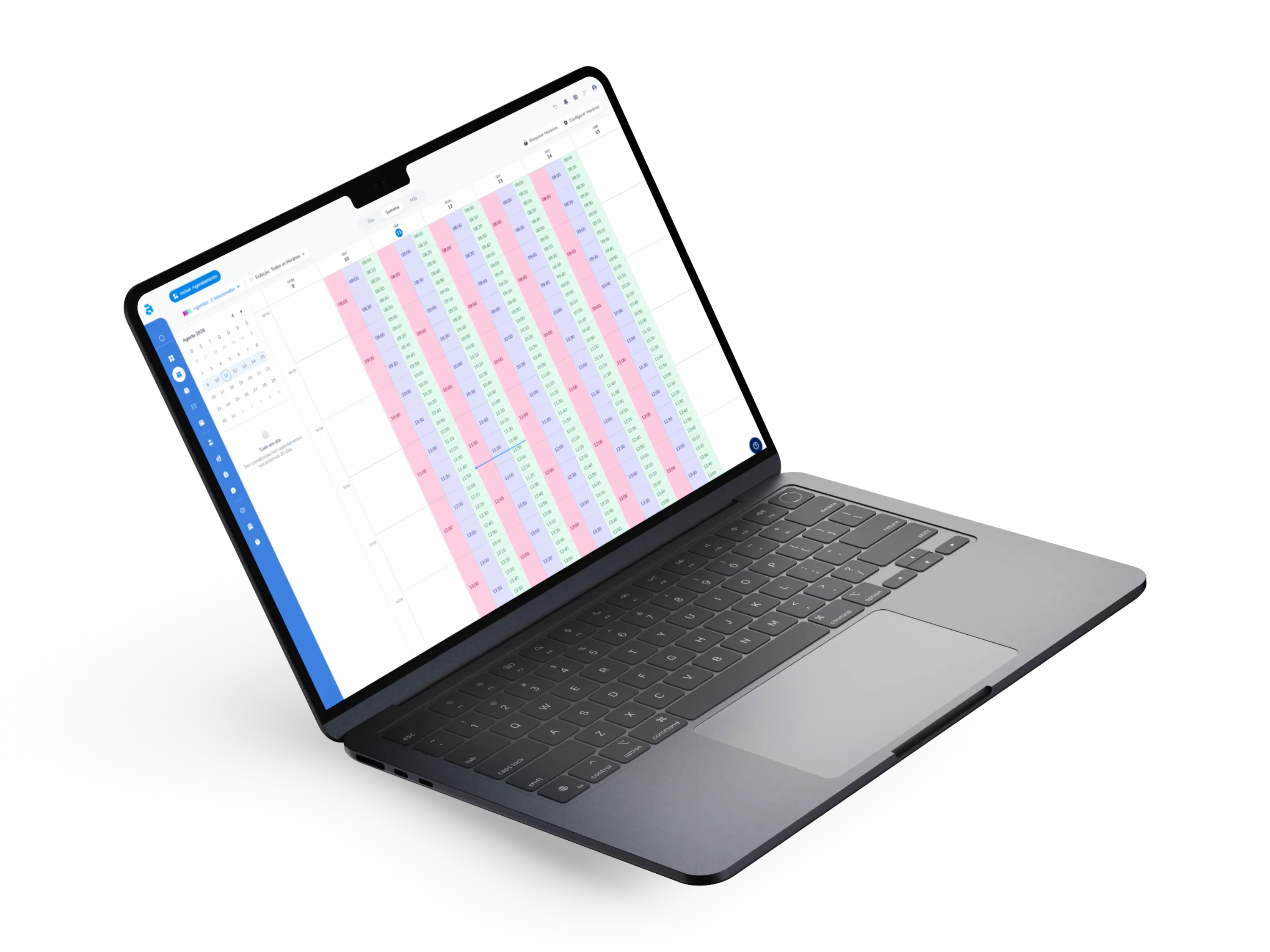
One calendar per professional, one view of the whole
From the front desk to the manager, each person sees and can do exactly what their role allows.
Each professional with their own hours, services, and rules. The manager follows everything on a single dashboard, filtered by person, service, and period.
Administrator and operational profiles define who views, edits, and manages each calendar, without exposing sensitive data.
Branches, offices, or salons: each location with its own address and booking link, managed from the same account.
Bidirectional with Google Calendar and Outlook: personal commitments block slots in eAgendas, and vice versa.
Ask before, note during, evaluate after
Every answer stays attached to the appointment and the client’s history. No paper, no side spreadsheet, no rework.
Build your booking page form with the fields you need. Clients answer while reserving.
Intake forms, consent agreements, or briefings, sent automatically after confirmation.
Satisfaction survey triggered by the notification rule you define.
Get paid at booking, not after
Native payment integration: the slot only goes on the calendar once the payment is approved.
Clients choose how to pay right on the booking screen, with no external link and no chasing payments by message.
Payment approved, slot reserved. No checking receipts or reconciling a spreadsheet at the end of the day.
People who pay upfront show up. Prepayment cuts no-shows and protects your team’s hours.
Plays well with the tools you already use
A confirmed booking doesn’t sit still on the calendar: it travels to your calendar, your video calls, your billing, your CRM and your own system.
-
Google Calendar · Outlook
Slot blocked both ways, in real time.
-
Google Meet · Zoom · Teams
A unique video link, created and sent with the confirmation.
-
Mercado Pago
Payment charged right at booking time.

-
RD Station
Every booking becomes a lead in your marketing funnel.
-
Your site and your email
Page embedded via iframe, messages sent from your own domain.
-
Your system
Webhooks push every event and the REST API creates and queries bookings.



Frequently asked questions
What everyone asks before creating an account. Straight answers, no runaround.
There's no limit. You can create as many services as you need, each with its own duration, price, form, and availability rules.
Yes. Each professional has their own calendar, schedules, and services. Managers can view and administer all calendars from a unified dashboard.
Yes. After initial setup, reminders are sent automatically via WhatsApp, email, or SMS according to the rules you define.
Yes. The payment integration allows you to charge via credit card or digital payment methods directly on the booking screen. Payment is confirmed before the time slot is reserved.
Yes. The platform automatically generates Google Meet or Zoom links and sends them to the client with the booking confirmation.
Yes. You can create text fields, multiple choice, file uploads, and more. You can also send pre-appointment forms after booking confirmation.
Yes. Sync is bidirectional and real-time: appointments created in eAgendas appear in Google Calendar and vice versa, preventing scheduling conflicts.
No. eAgendas works 100% in the browser, on any device. Your clients also book through the browser, no app download required.
Your question isn't here?
Talk to usYour booking page could be live today
Create an account, add a service, share the link. Minutes, not days.