How to Change the Slug (Account Name) on eAgendas
On eAgenda, each organization has a slug, which serves as the account identifier within the platform. This slug is used in all scheduling links, defining the address your clients access to book appointments.
When you create your account, a slug is initially defined. However, over time, you may need to change it — whether due to a brand change, standardizing your business name, or updating the links shared with your clients. eAgenda allows this change simply and quickly, ensuring flexibility in managing your online presence.
It is important to note that the slug is directly linked to all scheduling links. Therefore, any change will automatically affect the addresses used to access the schedules, requiring attention at the time of the change to prevent clients from using outdated links.
What is the account slug?
The slug is the name that identifies your organization in eAgenda’s scheduling links.
Link examples:
minhaagendavirtual.com.br/slugslug.eagenda.com.br(for those using the eAgenda domain)
Important considerations before changing the slug
When changing the account slug, consider the following points:
- All scheduling links will be automatically updated
- Old links will stop working
- You will need to update links shared on social media, websites, messages, and other channels
Step by Step: How to Change the Account Slug
To change your account slug on eAgenda, follow the instructions below:
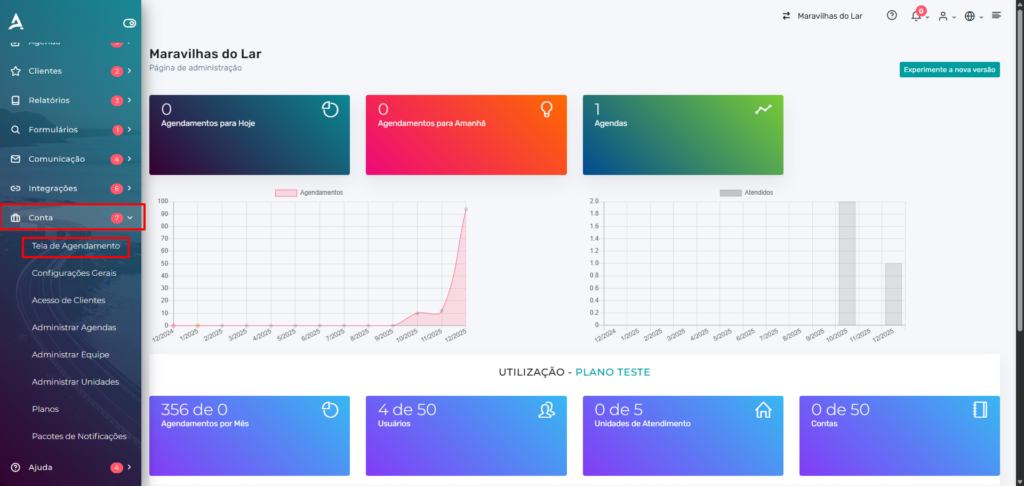
- Access the platform’s side menu and click on Account
- Then, access the Scheduling Screen option
- Locate the second field called “Enter the abbreviation or name to identify your business or service”
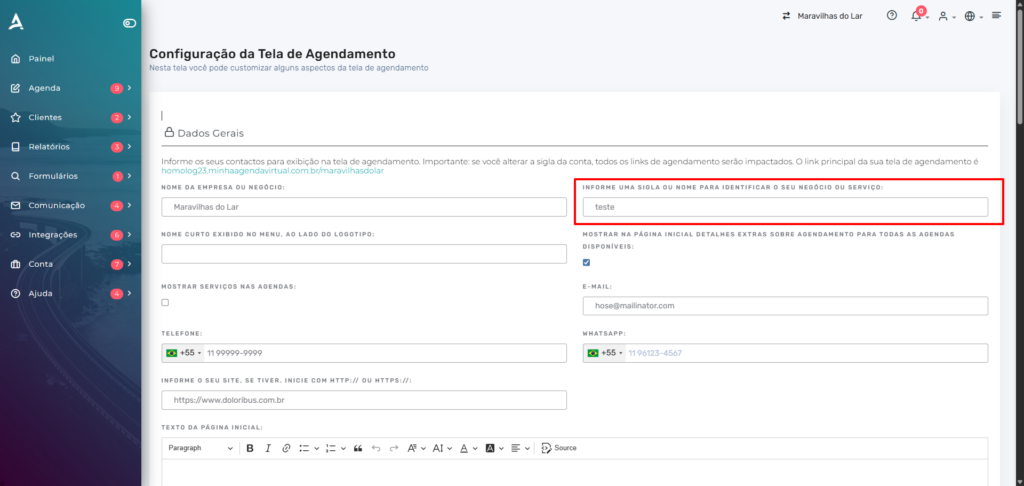
- Change the value to the desired new slug
- Scroll to the bottom of the page
- Click Save
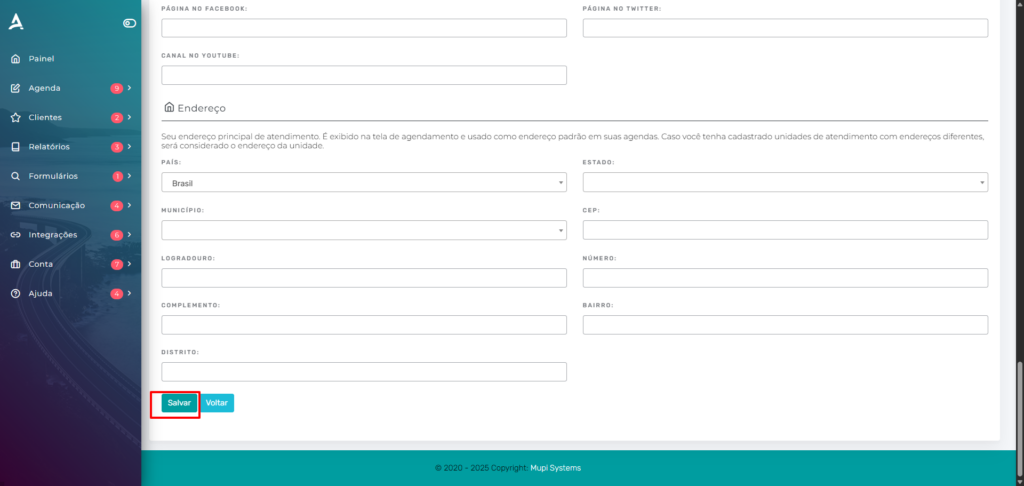
After saving, the change will be applied automatically.
What happens after the change?
Once the slug is modified:
- All scheduling links will use the new slug
- Links with the previous slug will no longer work
- You will need to share the new links with your clients
When is it recommended to change the slug?
Changing the slug is recommended when:
- The company or brand name has been changed
- There is a need to standardize scheduling links
- Old links need to be replaced with new addresses
Conclusion
eAgenda offers full flexibility so you can keep your scheduling links always aligned with your business identity. The ability to change the account slug allows you to adapt your digital presence as your brand evolves, maintaining organization and professionalism in communication with your clients.
However, since this is a change that directly impacts access links, it is essential to plan this change carefully, ensuring that all communication channels are updated. This way, you avoid issues and ensure a smooth and efficient experience for those who use your services.
Mupi Systems offers a range of technological solutions for all types of businesses. Discover our platforms that bring innovation to the market.
Get in Touch or Learn More
📞 WhatsApp: [Click here to send us a message] 🌐 eAgenda Platform: [Discover the tool] 🏢 Our Company: [Mupi Systems – Innovative Solutions] 📧 Email: [contato@mupisystems.com.br] 📚 Tutorials and Documentation: [Access our guides and tutorials]