How to Purchase Sending Credits on eAgendas
On eAgenda, AgendaCoins are essential elements for the proper functioning of notification rules and system automation. They act as internal credits that enable automatic actions such as sending reminders, appointment confirmations, and cancellation notices.
These messages can be sent through various communication channels integrated into the platform, including Email, WhatsApp, and SMS, ensuring that the end user receives all necessary information quickly and reliably.
The use of AgendaCoins ensures that each notification is processed efficiently, keeping communication active between the service provider and the client. Additionally, managing these credits helps optimize operational costs, offering a practical and transparent way to manage the volume of messages sent.
With this, eAgenda provides a more complete and professional experience, reducing no-shows, increasing client engagement, and strengthening relationships through automated, personalized, and effective communication.
Step by Step: How to Purchase AgendaCoins
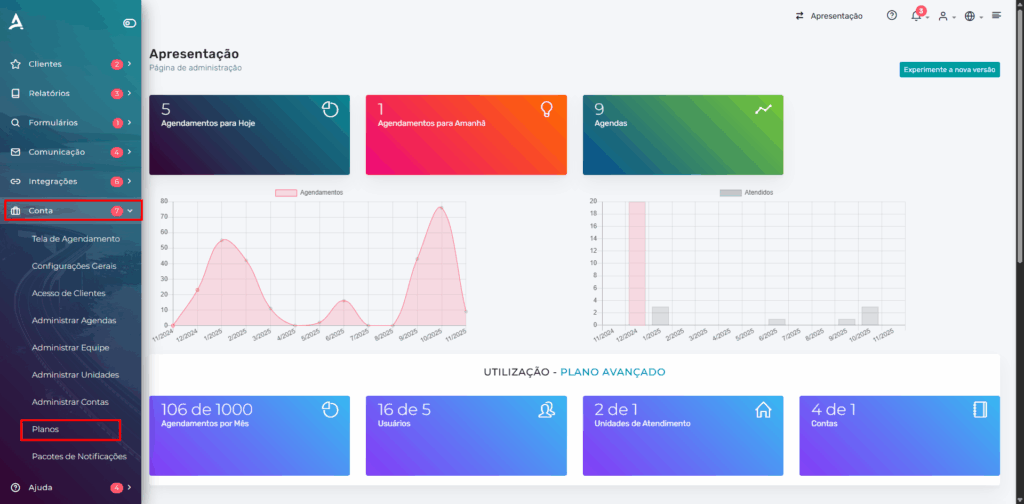
In the side menu, click on Account > Plans.
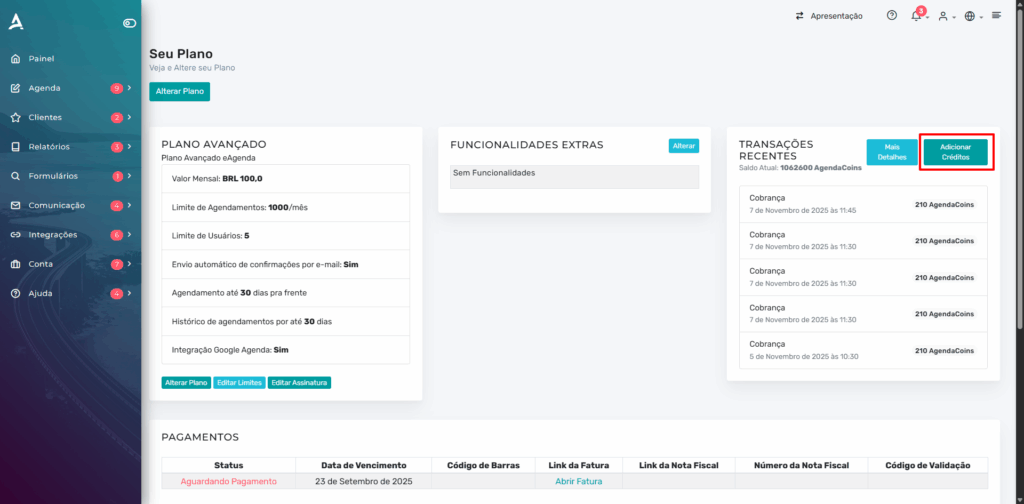
Next, in the upper right corner of the screen, locate and click the “Add Credits” button. This option allows you to top up your balance on the platform, ensuring that you can continue using all sending features without interruptions.
After the previous step, simply enter the desired amount of AgendaCoins.
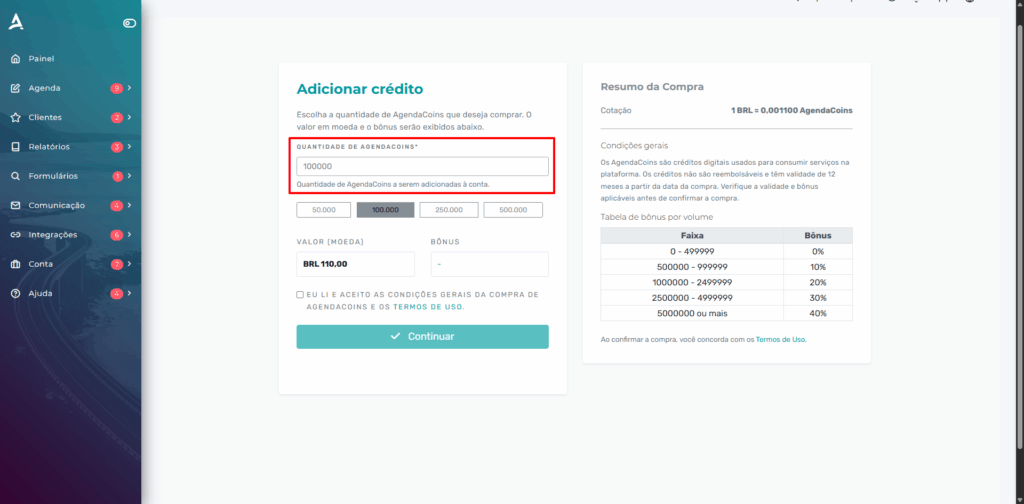
Done! Just accept the Terms of Use and click Continue.
Conclusion
In summary, in this tutorial you learned how to use AgendaCoins on eAgenda, understanding their importance as essential internal credits for the functioning of automatic notifications and personalized communications on the platform.
With AgendaCoins, you can send reminders, confirmations via email, WhatsApp, or SMS, in a simple, practical, and efficient way. Additionally, you saw how these credits contribute to operational cost control, ensuring fast, secure, and reliable communication with your clients.
You also learned how to purchase new credits easily: simply access Account > Plans, click “Add Credits”, enter the desired amount of AgendaCoins, and confirm the transaction.
This feature makes message management more transparent, automated, and professional, strengthening your client relationships and optimizing your appointment routine.
Mupi Systems offers a range of technological solutions for all types of businesses. Discover our platforms that bring innovation to the market.
Get in Touch or Learn More
📞 WhatsApp: [Click here to send us a message] 🌐 eAgenda Platform: [Discover the tool] 🏢 Our Company: [Mupi Systems – Innovative Solutions] 📧 Email: [contato@mupisystems.com.br] 📚 Tutorials and Documentation: [Access our guides and tutorials]