How to Control the Appointment Access List via External API
Overview
eAgenda allows you to automatically validate whether a client is authorized to make an appointment using an Access List connected to an external API.
When the client provides their ID number during the booking process, eAgenda sends an HTTP POST request to the configured URL, using a timestamp and HMAC-SHA256 signature to ensure security and communication integrity.
In this document you will find:
- How the request structure sent by eAgenda works
- How to develop the external API responsible for validation
- How to create the Access List that validates via external API
- How to share the list link with your clients
Request Structure Sent by eAgenda
Request Body (JSON)
eAgenda sends the identifier provided by the client in the configured field (e.g., ID number):
{ “identifier”: “12345678901” }
{
  "identifier": "12345678901"
}
Headers Sent
The headers add security and authentication:
X-Timestamp: UNIX timestamp of the requestX-Signature: HMAC-SHA256 hash generated from the body + timestampContent-Type: application/json
Method
POSTHow to Develop Your External API
The external API must:
- Verify the timestamp to prevent replay attacks
- Validate the HMAC-SHA256 signature
- Check whether the provided identifier is authorized
- Respond with
{ "authorized": true/false }
Complete Example in Python + Flask
from flask import Flask, request, jsonify import hmac import hashlib import time
app = Flask(__name__)
SECRET_KEY = “my-super-secure-secret-key-123”
AUTHORIZED_CLIENTS = [ “01234567890”, “12345678901”, “98765432100”, “11122233344” ]
TIME_TOLERANCE = 120
def verify_signature(body, timestamp, received_signature): message = body + timestamp expected_signature = hmac.new( SECRET_KEY.encode(‘utf-8’), message.encode(‘utf-8’), hashlib.sha256 ).hexdigest() return hmac.compare_digest(expected_signature, received_signature)
@app.route(‘/validate’, methods=[‘POST’]) def validate_client(): timestamp_header = request.headers.get(‘X-Timestamp’) signature_header = request.headers.get(‘X-Signature’)
if not timestamp\_header or not signature\_header:
    return jsonify({"error": "X-Timestamp and X-Signature headers are required"}), 400

body = request.get\_data(as\_text=True)

try:
    request\_time = int(timestamp\_header)
    current\_time = int(time.time())
    diff = abs(current\_time - request\_time)
    if diff > TIME\_TOLERANCE:
        return jsonify({"authorized": False, "error": "Request expired"}), 403
except:
    return jsonify({"error": "Invalid timestamp"}), 400

if not verify\_signature(body, timestamp\_header, signature\_header):
    return jsonify({"authorized": False, "error": "Invalid signature"}), 403

data = request.get\_json()
identifier = data.get("identifier")

if not identifier:
    return jsonify({"error": "Field 'identifier' is required"}), 400

authorized = identifier in AUTHORIZED\_CLIENTS

return jsonify({"authorized": authorized, "identifier": identifier}), 200
@app.route(‘/health’, methods=[‘GET’]) def health(): return jsonify({ “status”: “online”, “secret_key_configured”: True, “authorized_clients_count”: len(AUTHORIZED_CLIENTS) }), 200
if __name__ == “__main__”: app.run(debug=True, port=5000)
from flask import Flask, request, jsonify
import hmac
import hashlib
import time

app = Flask(__name__)

SECRET_KEY = "my-super-secure-secret-key-123"

AUTHORIZED_CLIENTS = [
    "01234567890",
    "12345678901",
    "98765432100",
    "11122233344"
]

TIME_TOLERANCE = 120

def verify_signature(body, timestamp, received_signature):
    message = body + timestamp
    expected_signature = hmac.new(
        SECRET_KEY.encode('utf-8'),
        message.encode('utf-8'),
        hashlib.sha256
    ).hexdigest()
    return hmac.compare_digest(expected_signature, received_signature)

@app.route('/validate', methods=['POST'])
def validate_client():
    timestamp_header = request.headers.get('X-Timestamp')
    signature_header = request.headers.get('X-Signature')

    if not timestamp_header or not signature_header:
        return jsonify({"error": "X-Timestamp and X-Signature headers are required"}), 400

    body = request.get_data(as_text=True)

    try:
        request_time = int(timestamp_header)
        current_time = int(time.time())
        diff = abs(current_time - request_time)
        if diff > TIME_TOLERANCE:
            return jsonify({"authorized": False, "error": "Request expired"}), 403
    except:
        return jsonify({"error": "Invalid timestamp"}), 400

    if not verify_signature(body, timestamp_header, signature_header):
        return jsonify({"authorized": False, "error": "Invalid signature"}), 403

    data = request.get_json()
    identifier = data.get("identifier")

    if not identifier:
        return jsonify({"error": "Field 'identifier' is required"}), 400

    authorized = identifier in AUTHORIZED_CLIENTS

    return jsonify({"authorized": authorized, "identifier": identifier}), 200

@app.route('/health', methods=['GET'])
def health():
    return jsonify({
        "status": "online",
        "secret_key_configured": True,
        "authorized_clients_count": len(AUTHORIZED_CLIENTS)
    }), 200

if __name__ == "__main__":
    app.run(debug=True, port=5000)
Response Examples
Authorized client
{ “authorized”: true, “identifier”: “12345678901” }
{
  "authorized": true,
  "identifier": "12345678901"
}
Unauthorized client
{ “authorized”: false, “identifier”: “12345678901” }
{
  "authorized": false,
  "identifier": "12345678901"
}
How to Create the Access List That Validates via External API
Step 1 — Access the platform
- Go to:
[https://eagendas.com](https://eagendas.com) - Log in with your account.
Step 2 — Navigate to the correct menu
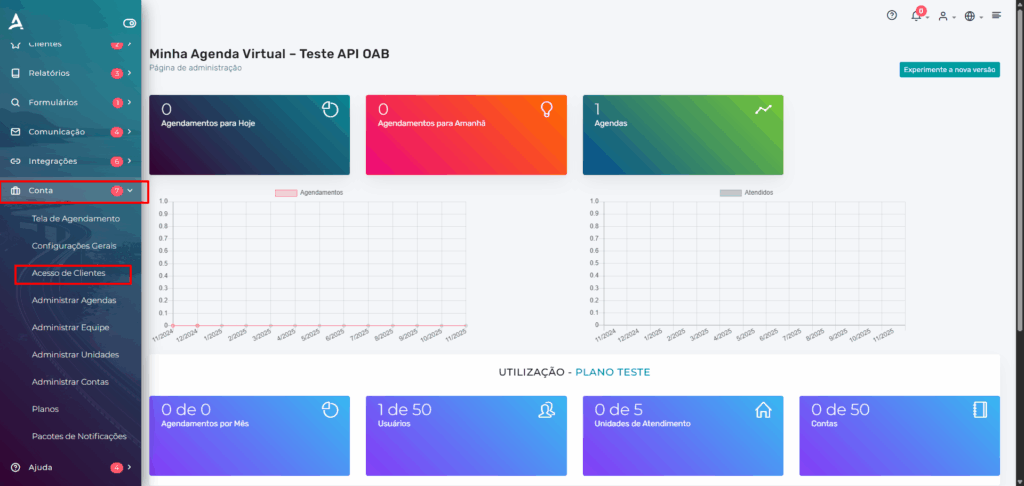
- In the sidebar menu, click on Account
- Click on Client Access
Step 3 — Create a new list
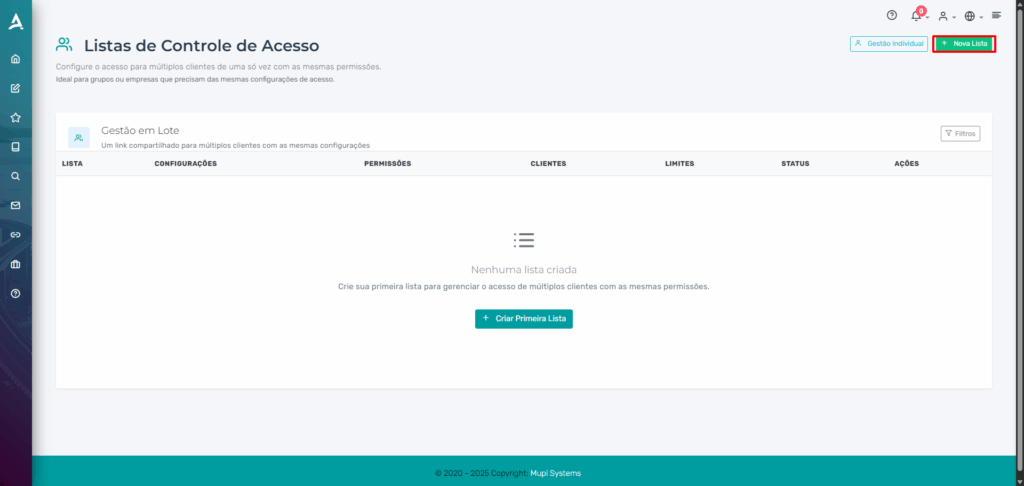
- Click on New List
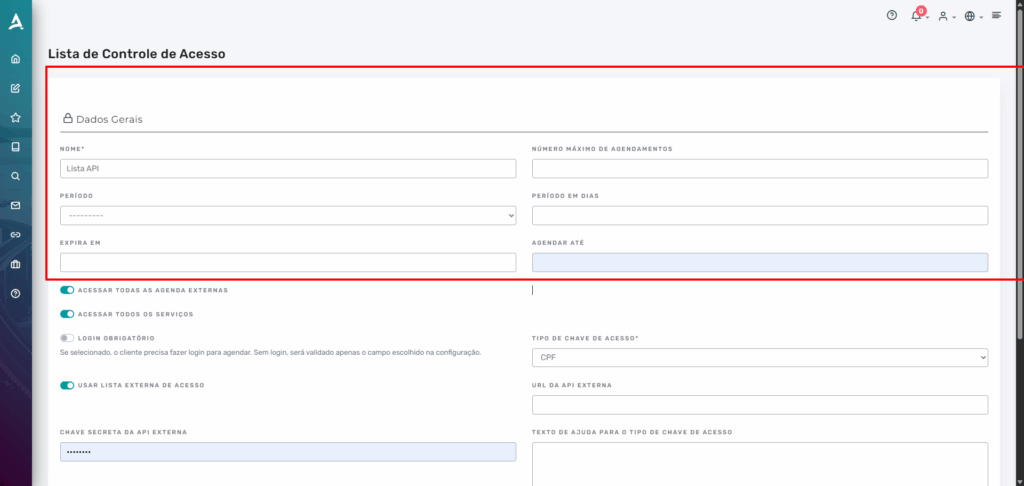
- In the List Name field, enter any name (e.g.,
test) - The remaining fields can be left blank
Step 4 — Configure the validation type
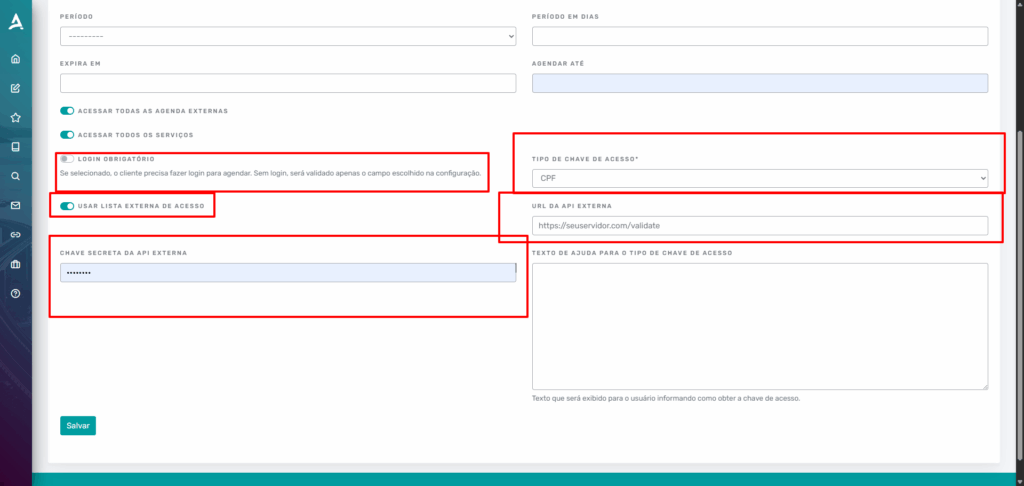
- Required login: uncheck
- Use External Access List: check
- Access Key Type: select CPF
Step 5 — Configure the external integration
Fill in:
- External API URL:
E.g.:
https://yourserver.com/validate - Secret Key:
E.g.:
my-super-secure-secret-key-123
Step 6 — Finish
Click Save.
Your list is now ready to automatically validate each ID number through the external API.
How to Share the List with Clients
- In eAgenda, go to Account → Client Access
- Locate the created list
- Click on Actions
- Select Copy shared link
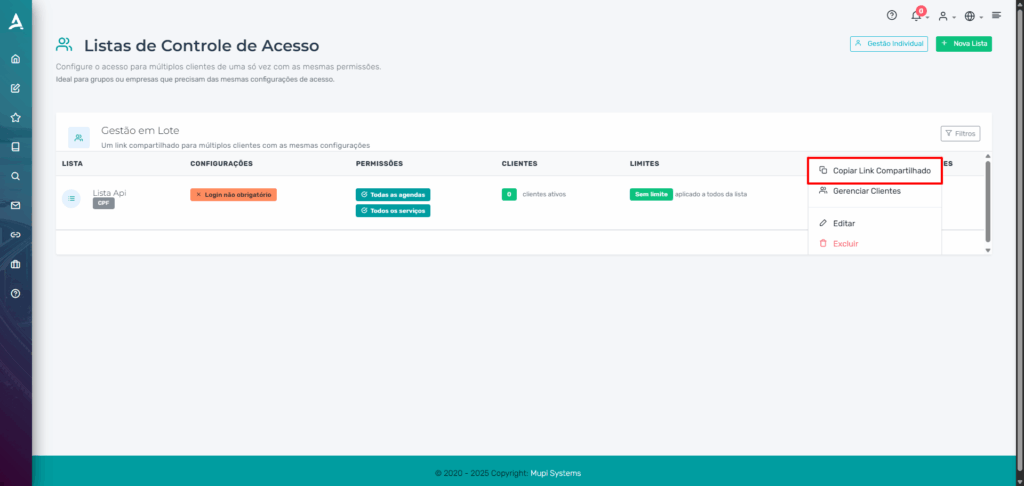
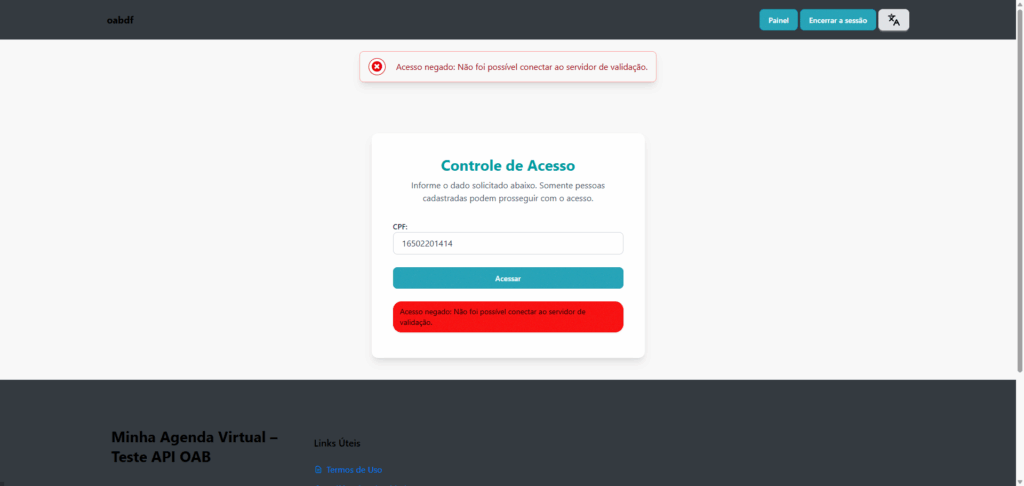
This link can be sent to clients: They enter their ID number → the system queries the API → automatically grants or blocks the appointment.
Contact Us or Learn More
We are here to help! Access our official channels:
📞 WhatsApp : Click here to send us a message 🌐 eAgenda Platform : Discover eAgenda 🏢 Our Company : Mupi Systems – Innovative Solutions 📧 Email : contato@mupisystems.com.br 📚 Tutorials and Documentation : Access our guides and tutorials